Quick Check
20 minTwo short answers from memory, on your topic. Miss one and you see the correction; review it and the window is still yours.
For students · iPhone
With Kettle, the apps you choose stay locked until you’ve earned them. A Quick Check of two short questions earns 20 minutes. A longer Topic Review earns 60.
How it works
 Boil first.
A Screen Time shield covers it: “Boil first. Scroll after.”
Answer from memory, on a topic you chose. Miss one and Kettle shows you why.
That’s a Boil done. You earned the scroll.
Start your window when you’re ready. When it ends, your apps lock again.
On iOS 26.5 or later, one tap on the shield opens Kettle straight onto your first question; on earlier versions you tap a Kettle notification. A longer Topic Review earns 60 minutes. Illustrations and example question, not screenshots.
Two ways to earn
Two short answers from memory, on your topic. Miss one and you see the correction; review it and the window is still yours.
A longer, bounded review of one topic. A useful step forward, not proof of mastery.
You see what’s needed before you start, so there are no surprise hoops.
Earned, not banked
Some apps hand you a balance of minutes to hoard. Kettle doesn’t. Each Boil earns one window, and you start it when you’re ready: after the problem set, not halfway through it.
When the window ends, your apps lock again and the next Boil is waiting. No stockpile to burn through at 2am, and no timer quietly running while you work.
Finals week tip: pick the course you’re most behind on as your topic. Every break you take starts with two questions on it.
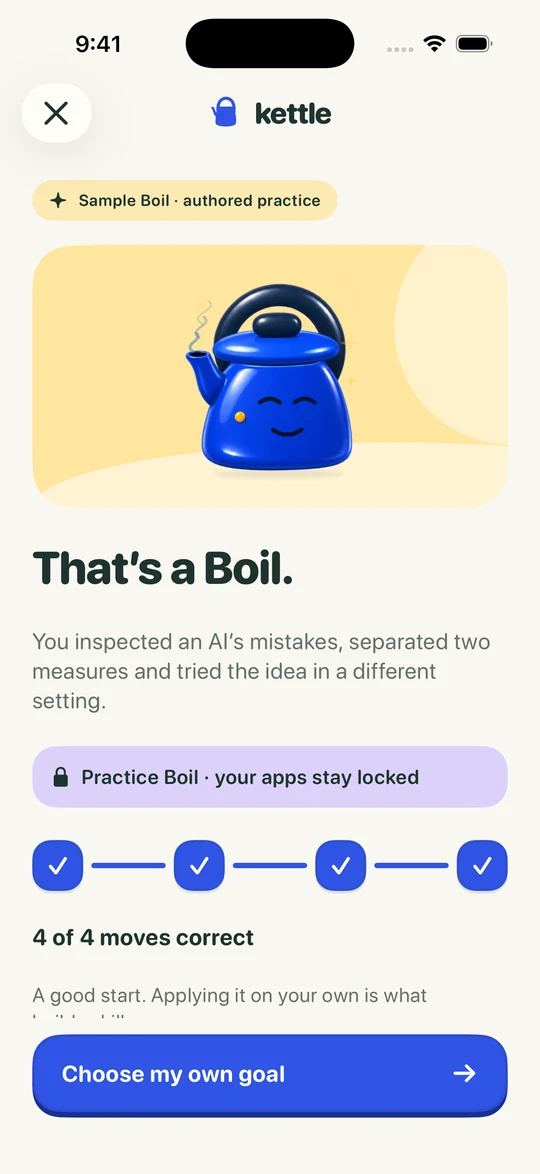
The end of a sample Boil. Practice Boils are for trying Kettle, so they don’t unlock apps.
Your first earned window is free on a new account. After that, earning windows is part of Kettle Pro, a monthly or yearly subscription. The App Store shows the price for your country before you decide. Unlock for today and turning blocking off are always free.
No. Each Boil earns one window, one at a time. You choose when to start it; when it ends, your apps lock again.
No. You can choose a real-life task instead, like laundry or a run, and confirm it yourself. Kettle doesn’t track it; it takes your word. Your first task window is free; after that, tasks are part of Kettle Pro.
No. Kettle is made for adults managing their own phone, such as college students. You set it up, and you can always unlock for today.
Yes. Unlock for today is always there, and you can turn blocking off whenever you need to, without paying. It just doesn’t count as a Boil, so your kettle cools a little.
Two questions stand between you and your feed.